TuneZ Discord Music Bot

A Python-based Discord music bot that is ready to use out of the box for everyone who wants to play music on Discord.



📖 Preface
Why was this made?
- A friend asked me for YinXi not long ago. Later, after reading YEE式机器龙's post, I realized how difficult music bots have become nowadays.
-
Since I already had YinXi, I thought: what if I extracted the music-related code and made a dedicated music bot?
Would it become popular? -
Plus, yt-dlp can easily get 403 (permission denied) or other errors if requests keep coming from the same IP.
(This is probably why music bots are becoming rarer - stable sources are genuinely hard to find.)
But if every user just self-hosts their Discord bot according to their own needs, maybe this problem could be solved? - So I made TuneZ
Why is it called TuneZ?
- Actually, the reason is super simple
-
First, I randomly asked Copilot to help me think of a name, and it came up with "Tune".
Later, I realized that people born around 2000 are called Generation Z
So then came the "Z"
Put together, it becomes TuneZ
Are there any risks?
- The answer is actually quite simple - using it yourself means no risks
- Usually, using it yourself or letting friends try it out won't cause any issues
-
Unless you decide to use it for profit
Then I can't be held responsible :)
I won't take any responsibility
✨ Features
Music Playback
Play high-quality audio streams from YouTube with smooth playback.
Playlist Management
Full control over playlists, including add, remove, skip, clear, and more.
Custom Playlists
Create your own playlists with custom names using single YouTube links.
Loop Modes
Multiple loop options: none, single track, or playlist loop.
Custom Emojis
Built-in beautiful light blue animated emojis, customizable too!
Multi-language Support
Supports English, Traditional Chinese, and Simplified Chinese.
Easy to Get Started
Out of the box! Supports Windows exe, Docker, Python, and more.
📖 Quick Start
Method One: Invite the Bot
If you just want a Discord music bot, you can directly invite YinXi to your server.

Method Two: Self-host the Bot (Recommended)
Want more control and features? Host TuneZ yourself:
- Windows: Download the
.exefile from Releases - Docker:
docker compose up -d - Python:
uv run main.py
See the Installation Guide for detailed instructions.
🎮 Demo
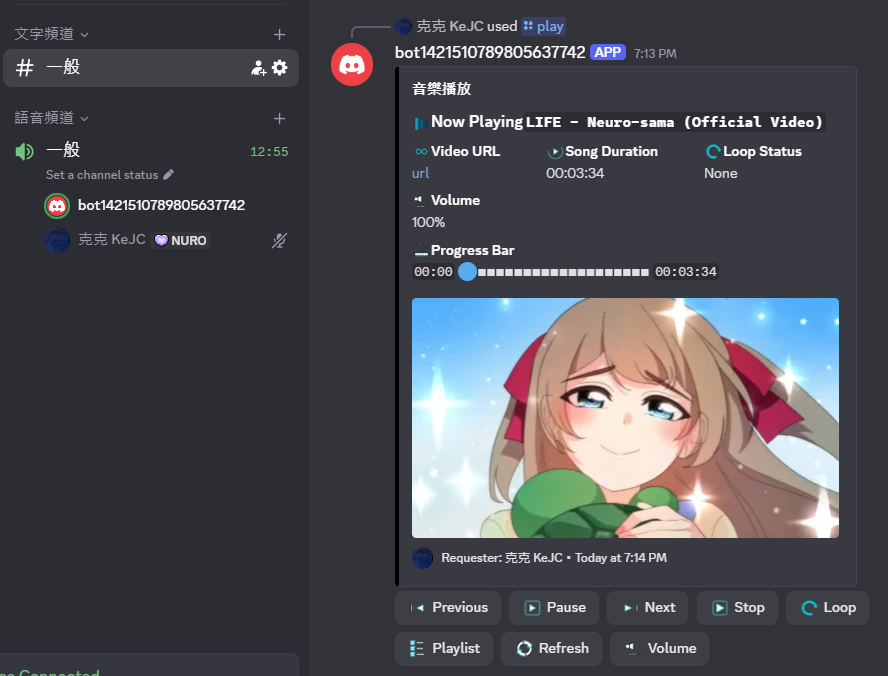
TuneZ supports Chinese; it just shows English because Discord’s default language is English.
🛠️ Available Commands
| Command | Description |
|---|---|
/play [query] |
Play music or add to playlist |
/skip |
Skip current song |
/pause |
Pause playback |
/resume |
Resume playback |
/queue |
View playlist |
/loop [mode] |
Set loop mode (none/single/list) |
/volume [0-200] |
Adjust volume |
/stop |
Stop playback and leave voice channel |
📚 Documentation
- Create Discord Bot - How to create a Discord Bot
- Installation Guide - How to set up TuneZ
- Command List - Complete list of all commands
- Custom Playlists - Create and manage playlists
- FAQ - Troubleshooting
💬 Support
- GitHub Issues: Report bugs or request features
- Whether you’re a coding expert or a beginner, feel free to submit Issues for any problems or feature requests
📄 License
TuneZ is licensed under Apache License 2.0. You can:
- ✅ Use the project code for personal or commercial purposes
- ✅ Modify and customize
- ✅ Distribute
You cannot:
- ❌ Hold the author responsible
- ❌ Use the name for endorsements
See LICENSE.
This is my source of motivation!