TuneZ Discord Bot

A Python-based Discord bot that works out-of-the-box for anyone who needs to play music on Discord.



✨ Features
Music Playback
Play music from YouTube with high quality audio streaming and smooth playback.
Queue Management
Full control over your playlist with add, remove, skip, clear, and reorder functions.
Loop Modes
Multiple loop options: none, single track, or entire playlist.
Custom Emojis
Beautiful animated light blue emojis included. Customize with your own!
Multi-language
Supports English, Traditional Chinese, and Simplified Chinese.
Easy Setup
Works out-of-the-box. Windows .exe, Docker, or Python - your choice!
📖 Quick Start
Option 1: Invite the Bot
If you just want a Discord music bot, you can directly invite YinXi to your server.

Option 2: Self-hosting
For more control and features, host TuneZ yourself:
- Windows: Download the
.exefrom Releases - Docker:
docker compose up -d - Python:
uv run main.py
See Installation Guide for detailed instructions.
🎮 Demo
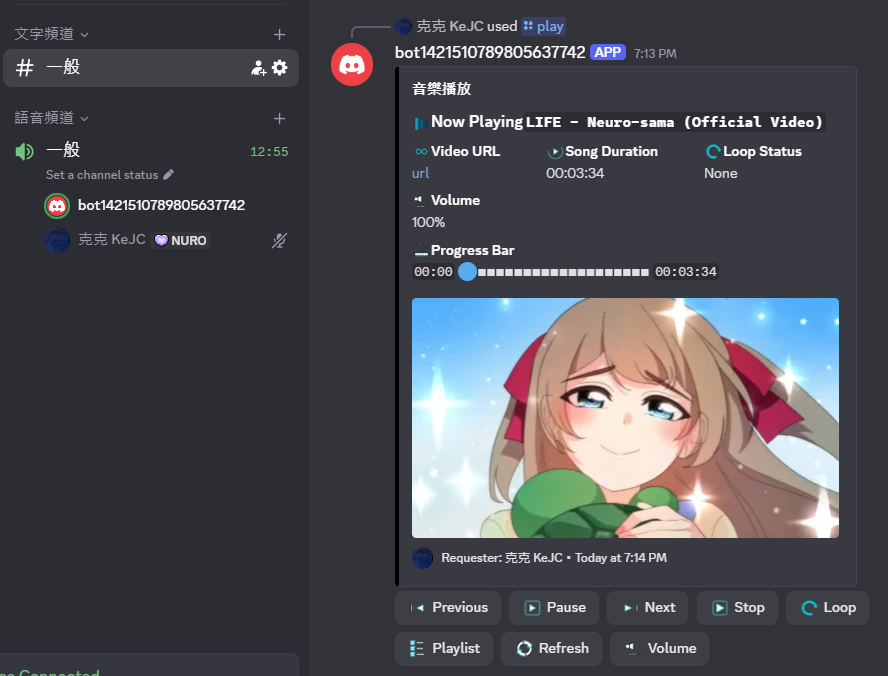
🛠️ Available Commands
| Command | Description |
|---|---|
/play [query] |
Play music or add to queue |
/skip |
Skip the current song |
/pause |
Pause playback |
/resume |
Resume playback |
/queue |
View the current playlist |
/loop [mode] |
Set loop mode (none/single/list) |
/volume [0-200] |
Adjust volume |
/stop |
Stop and leave the voice channel |
📚 Documentation
- Installation Guide - How to set up TuneZ
- Command Reference - Full list of all commands
- Custom Playlists - Create and manage playlists
- FAQ - Frequently asked questions
💬 Support
- GitHub Issues: Report bugs or request features
📄 License
This project is licensed under the Apache License 2.0 - see the LICENSE file for details.
It's our source of motivation!